

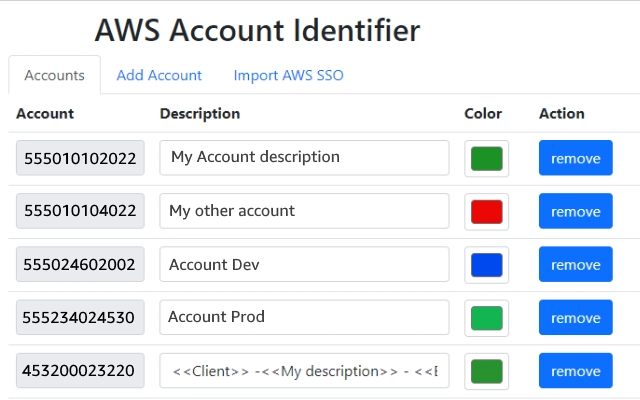
Description
AWS Account Header for Navigation Bar
Overview
The AWS Account Header for Navigation Bar is a browser extension designed to enhance visibility and clarity within the AWS Management Console. Its primary function is to display a customizable header in the navigation bar that reflects the current AWS account, including a description and color-coded indicator based on the account’s identity. This is especially valuable in multi-account environments where users frequently switch between different AWS accounts, such as development, staging, and production. The extension helps reduce the risk of accidental configuration changes by providing immediate visual feedback on the active account.
Target users include cloud engineers, DevOps professionals, and system administrators who manage multiple AWS accounts. The tool supports seamless integration with AWS SSO (Single Sign-On) by allowing users to import account configurations directly from the AWS SSO start page, minimizing manual setup and maintenance. This streamlines workflow efficiency and reduces configuration errors.
Developed by AWS, the extension benefits from the credibility and deep integration with AWS services. It operates within the browser environment, requiring no installation on the local machine beyond the standard browser extension process. Real-world use cases include enterprise cloud teams managing complex AWS environments and developers working across multiple isolated accounts.
Key Features & Capabilities
- Account Identification Header – Displays a dynamic header in the AWS console navigation bar showing the current account name, description, and color code, enabling quick visual confirmation of the active environment.
- Multi-Account Support – Designed specifically for users managing multiple AWS accounts, helping prevent misconfigurations due to account confusion.
- SSO Account Import – Version 1.2.1 introduces the ability to import account details directly from the AWS SSO start page, reducing manual input and improving maintenance efficiency.
- Dynamic Styling and Positioning – The description has been moved to the lower bar to avoid interference with fixed-position console elements, ensuring full access to AWS console functionalities.
- Automatic Account Detection – Detects the active AWS account upon login and updates the header in real time, maintaining consistency across sessions.
These features are particularly useful in high-stakes environments where selecting the wrong account could lead to unintended changes or security risks. For example, a DevOps engineer switching between staging and production environments can instantly verify the current account without navigating through multiple menus. The integration with AWS SSO ensures that account lists remain up to date with minimal user effort.
User Interface, Workflow & Performance
The extension integrates directly into the AWS Management Console interface, adding a visual element to the navigation bar without disrupting the core layout. The UI is minimal and non-intrusive, using color-coded indicators and concise text to convey account information. Navigation remains unchanged, as the extension does not alter console functionality.
Workflow efficiency is enhanced by automatic detection of the active account and real-time header updates. Users do not need to manually refresh or configure settings after logging in. The extension operates in the background, with no visible performance impact reported in standard usage scenarios.
The developer did not specify resource usage details. Performance observations are based on general software behavior patterns. Stability is maintained through regular updates, with version 1.2.1 focused on fixing account detection and improving visual styling. The extension is designed to run consistently across sessions and browser restarts.
Compatibility & System Requirements
The AWS Account Header for Navigation Bar is compatible with Windows and Mac operating systems. It is designed as a browser extension, meaning it operates within supported web browsers such as Chrome, Firefox, or Edge, depending on the browser’s extension support.
Installation size is 1.2 MB, which is minimal and typical for browser extensions. The developer did not specify exact system requirements, including CPU or RAM usage. Compatibility information was partially provided, with support confirmed only for Windows and Mac platforms.
Users should ensure their browser is updated to the latest version to maintain compatibility and security. No additional software or system configurations are required for installation or operation.
Pros and Cons
Pros
- Provides immediate visual confirmation of the active AWS account
- Supports seamless SSO account import for easier maintenance
- Designed with usability in mind—non-intrusive and stable
- Free to use with no hidden costs or subscription fees
- Regular updates with bug fixes and UI improvements
Cons
- Requires a browser extension to function—limited to web-based AWS Console access
- Does not support Linux or other operating systems beyond Windows and Mac
- Relies on browser compatibility; may not work consistently across all browsers
- Color and description data depend on accurate account configuration in AWS SSO
- Advanced customization options are not available
FAQ Section
Is the AWS Account Header for Navigation Bar free to use?
Yes, the extension is completely free. There are no subscription fees or hidden costs associated with its use.
Does the extension work with AWS SSO?
Yes, version 1.2.1 includes support for importing account details directly from the AWS SSO start page, simplifying account management.
Can I use this extension on Linux?
Compatibility information is limited to Windows and Mac. The extension may not be available or functional on Linux systems.
Is the extension secure?
Developed by AWS, the extension adheres to the security standards of the AWS ecosystem. It operates within the browser’s extension framework and does not access sensitive data beyond the current session context.
How often are updates released?
Updates are released periodically to fix bugs and improve functionality. Version 1.2.1 was released on May 15, 2024, addressing account detection and styling issues.
Final Thoughts
The AWS Account Header for Navigation Bar is a practical, lightweight tool that significantly improves operational clarity in multi-account AWS environments. Its ability to display real-time account information with color and description makes it an essential utility for cloud professionals who manage multiple AWS accounts. The integration with AWS SSO and automatic detection reduce setup friction and enhance workflow consistency.
While it is limited to Windows and Mac and requires a browser, its simplicity, reliability, and zero cost make it a standout choice. For DevOps teams, cloud architects, and AWS administrators, this extension delivers a meaningful productivity boost without complexity.
Download AWS Account Header for Navigation Bar now
Guides & Tutorials for AWS Account Identifier Extension for Chrome
How to install AWS Account Identifier Extension for Chrome
- Click the Preview / Download button above.
- Once redirected, accept the terms and click Install.
- Wait for the AWS Account Identifier Extension for Chrome download to finish on your device.
How to use AWS Account Identifier Extension for Chrome
This software is primarily used for its core features described above. Open the app after installation to explore its capabilities.
User Reviews for AWS Account Identifier Extension for Chrome 0
No reviews found





